

A traditional bookkeeping/accounting practice use to be “closing the books” on a monthly basis to “lock in” the accounting and assure that there would be no changes moving forward.
While the process may not be necessary or desirable today in a fast-paced and ever-changing construction environment, it is a quick and available option in BIS. Best of all months may be reopened, if needed as well.
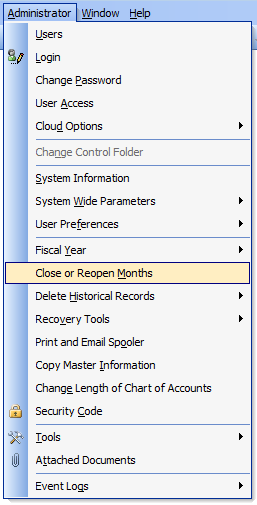
Go to Administrator and select “Close or Reopen Months” in the menu:
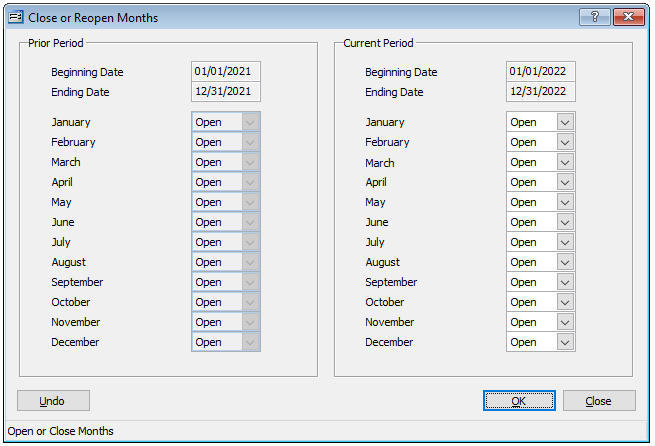
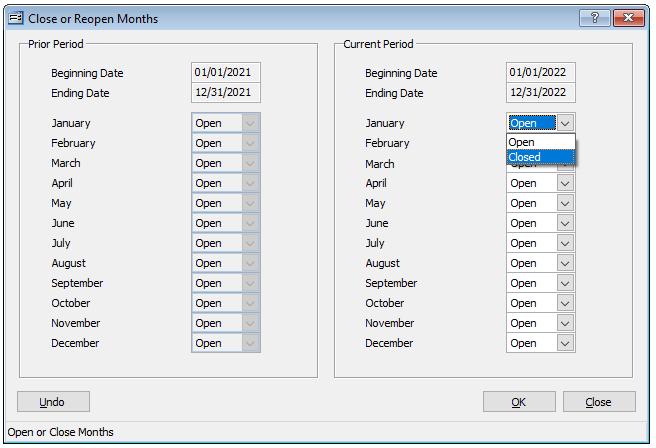
To close a month, simply click the drop-down arrow adjacent to the month and select “Closed.” Click “OK” when the process is completed.
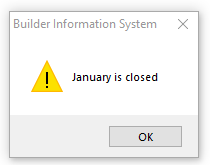
Now, if any user attempts to add, remove, or modify any transaction in that month, the user will receive a prompt indicating that the month is closed:
If at any time, it is imperative to add, remove, or modify any transaction in that month, simply access the Close or Reopen Months form again and reverse and save the change to the month.