

System Wide Parameters as the name implies is the primary area in BIS where options and settings are available which affect all related areas within BIS. These settings are generally set or modified by the BIS Administrator.
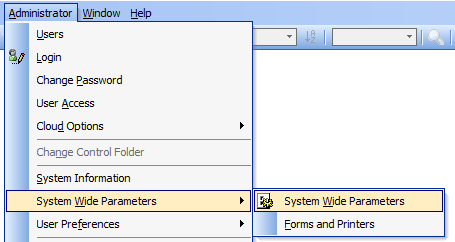
To access, go to Administrator, System Wide Parameters and select System Wide Parameters in the menu.
GL – General Ledger Tab
Accounts Sub-tab
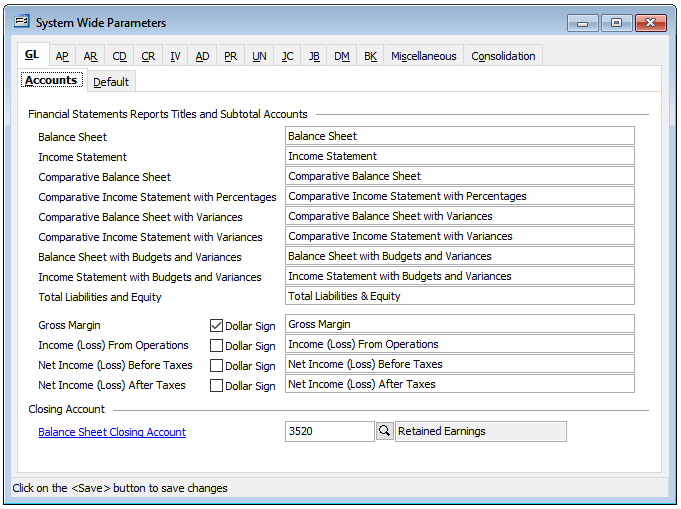
The GL tab, Accounts sub-tab first provides optional title fields for a number of Financial Statements reports and sub-total accounts. This allows an accountant or bookkeeper to retitle these financial related reports as desired.
To modify a report title, simply select and type the desired title text to replace the default report title.
Also available is whether you wish to include the dollar sign for Gross Margin, Income (Loss) From Operations, Net Income (Loss) Before Taxes, and Net Income (Loss) After Taxes.
The Closing Account, Balance Sheet Closing Account is also set on this form.
Default Sub-tab
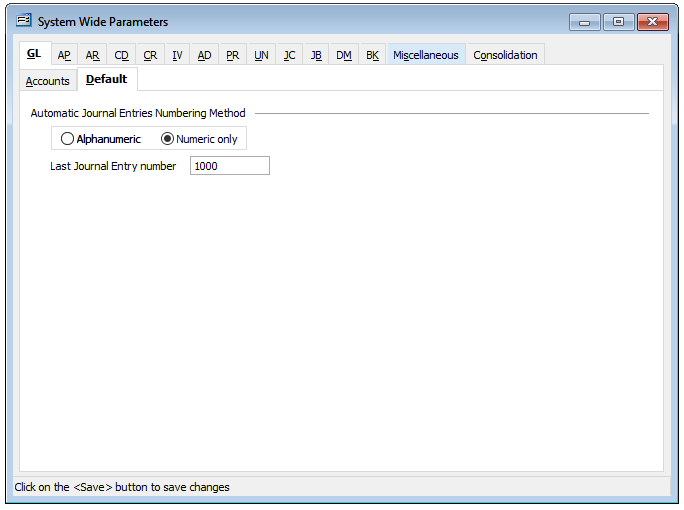
Default Sub-tab provides the options for Automatic Journal Entries Numbering Method, which is either Alphanumeric or Numeric only. Both are sequential.
Last Journal Entry number provides an option to change the number when Numeric Only is select. By changing or entering a number in this field, the next automatic journal entry number generated with be the next concurrent number.
Note: any modification made must be saved before closing out of System Wide Parameters.