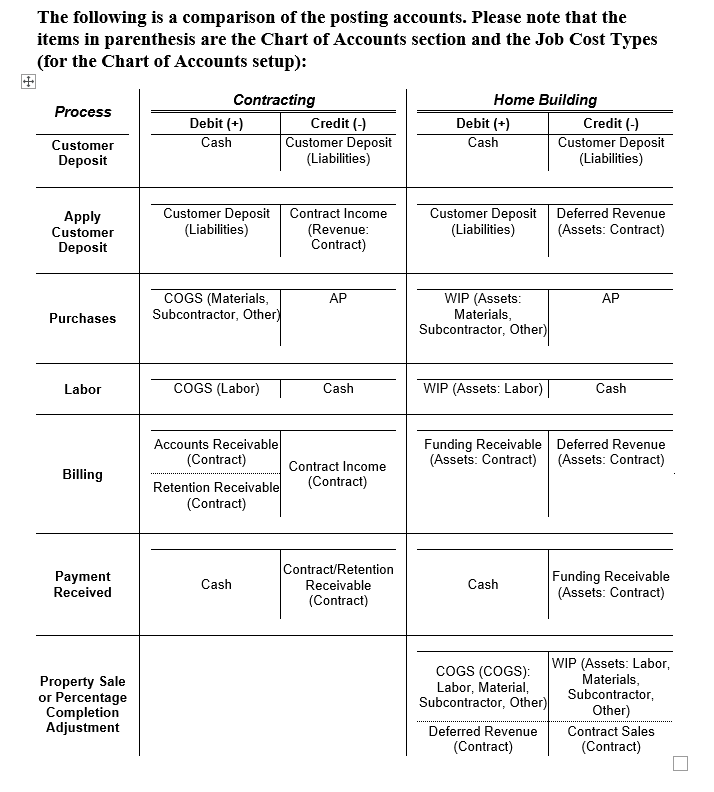
Home builders have different posting requirements than other builders.
With other general contractors, purchases are posted to Cost of Goods Sold and Accounts Payable. With home builders, purchases are posted to Work In Progress (WIP) and Accounts Payable. Similar differences apply to the billing side of jobs. This paper is intended to clarify the posting accounts needed for setup, but it is not authoritative as to every home builder’s accounting requirements.
In BIS, customer deposits are posted to a Deposit account and Cash, but are not yet linked to a Job. Usually when the contractor begins accumulating costs, the Deposit is applied to the job, and the Deposit is applied to Revenue.
Using the setup described herein, BIS users can continue to utilize the existing Application for Payment methods, including specifying the percent completion of jobs. Although the AIA billing format is not applicable as a Request for Funds from a Bank, there are several options:
- After processing the Application for Payment, the user can reprint the “Invoice” as a standard Contract Invoice.
- Using the Report Writer module, changes can be made to the AIA forms, particularly the cover page, to permit a format more appropriate for banks.
- Using the Report Writer module, changes can be made to the Contract Invoice format to convert it to a format more appropriate for banks.